AE+C4D卡通场景MG动画教程 2D and 3D Animation with After Effects and Cinema 4D
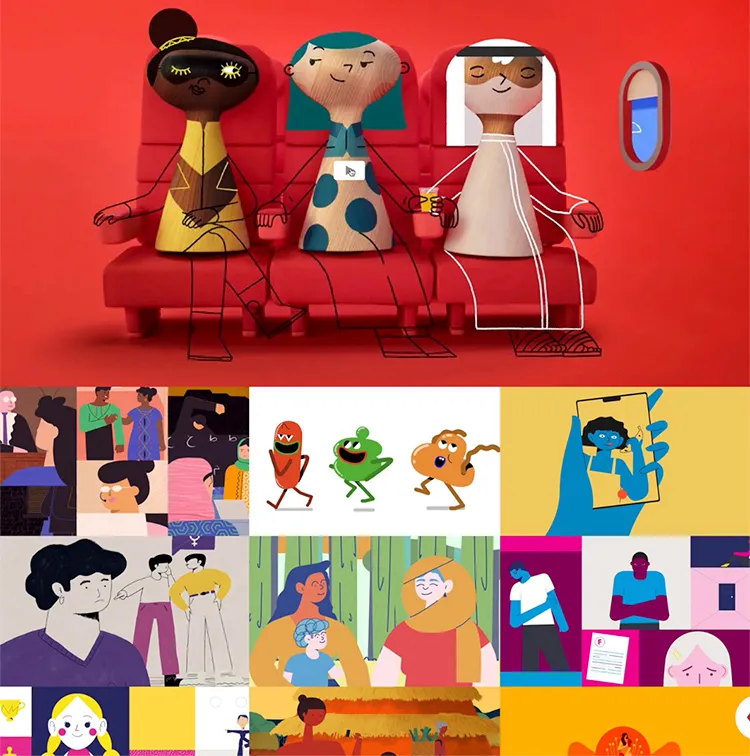
本套教程是一套非常实用的C4D的中高阶教程,教程语言为西班牙语,含英文字幕,教程共计67个视频。教程中讲解使用AE创建2D元素结合C4D的3D立体模型渲染,协作创建完整的MG场景动画片头教程。 In this course, you will learn to combine 2D and 3D animation techniques to surprise your viewers, adding depth to your animations and breaking the linear limits of 2D. 01-演示 02-影响 03-我们在课程中会做什么 04-脚本和画外音 05-故事板 06-首先订购 07-从插画到后效 08-后效1zui*终完成 09-后效2的zui*终完成 10-如何在Illustrator 1中绘制 11-如何在Illustrator 2中绘制 12-如何在Illustrator 3中绘制 13-如何在Illustrator 4中绘制 14-如何在Illustrator 5中绘制 15-如何在Illustrator 6中绘制 16-组装结构1 17-组装结构2 18-装配结构3 19-按重要性顺序设置动画1 20-按重要性顺序设置动画2 21-按重要性顺序制作动画3 22-按重要性顺序制作动画4 23-按重要性顺序制作动画5 24-辅助动画1 25-辅助动画2 26-次级动画3 27-辅助动画4 28-辅助动画5 29-角色动画1 30角色动画2(上) 31角色动画2(下) 32角色动画3 33-角色动画4 34-角色动画5 35角色动画6 36-3d模型1 37-3D模型2 38-3个3D模型 39-4个3D模型 40-3D模型5 41-3D模型6 42-创作3D场景1 43-创作3D场景2 创作3-44 3D场景 45-三维动画1 46-三维动画2 47-三维动画3 48-三维动画4 49-三维动画5 50-三维动画6 51-三维动画7 52-三维动画8 53-材料和照明1 54-材料和照明2 55-材料和照明3 56-材料和照明4 57-材料和照明5 58-导出3D场景,享受简单的生活 59-将零件组装在一起 60-后期制作1 61-后期制作2 62-后期制作3 63-后期制作4 64-后期制作5 65-后期生产6 66-保存项目并休息 67-2D和3D动画和4D影院 01 - Presentation 02 - Influences 03 - What will we do in the course 04 - Script and voice over 05 - Storyboard 06 - Order first of all 07 - From Illustrator to After Effects 08 - Final finish in After Effects 1 09 - Final finish in After Effects 2 10 - How to draw in Illustrator 1 11 - How to draw in Illustrator 2 12 - How to draw in Illustrator 3 13 - How to draw in Illustrator 4 14 - How to draw in Illustrator 5 15 - How to draw in Illustrator 6 16 - Assembling the structure 1 17 - Assembling the structure 2 18 - Assembling structure 3 19 - Animate in order of importance 1 20 - Animate in order of importance 2 21 - Animate in order of importance 3 22 - Animate in order of importance 4 23 - Animate in order of importance 5 24 - Secondary animations 1 25 - Secondary animations 2 26 - Secondary animations 3 27 - Secondary animations 4 28 - Secondary animations 5 29 - Character Animation 1 30 - Character Animation 2 (part one) 31 - Character Animation 2 (Part Two) 32 - Character Animation 3 33 - Character Animation 4 34 - Character Animation 5 35 - Character Animation 6 36 - 3D Models 1 37 - 3D Models 2 38 - 3D Models 3 39 - 3D Models 4 40 - 3D Models 5 41 - 3D Models 6 42 - Composing 3D scene 1 43 - Composing 3D scene 2 44 - Composing 3D scene 3 45 - Animate in three dimensions 1 46 - Animate in three dimensions 2 47 - Animate in three dimensions 3 48 - Animate in three dimensions 4 49 - Animate in three dimensions 5 50 - Animate in three dimensions 6 51 - Animate in three dimensions 7 52 - Animate in three dimensions 8 53 - Materials and lighting 1 54 - Materials and lighting 2 55 - Materials and lighting 3 56 - Materials and lighting 4 57 - Materials and lighting 5 58 - Export the 3D scene and have the simple life 59 - Put the parts together 60 - Postproduction 1 61 - Postproduction 2 62 - Postproduction 3 63 - Postproduction 4 64 - Postproduction 5 65 - Postproduction 6 66 - Save the project and rest 67 - 2D and 3D Animation with After Effects and Cinema 4D 下载视频教程 |


最新评论

- MAXON Cinema 4D C4D 2026.3.0 Win更新版发 2026-06-12
- X-Particles即将集成到Cinema 4D中,高级粒 2026-06-11
- Redshift 2026.6.0 重磅更新:六边形平铺功 2026-05-08
- BMS未来科幻日本千叶城市建筑楼房街道场景 2026-05-08
- Redshift 2026.5 更新详解:OpenPBR 材质成 2026-04-21
- Maxon发布重磅更新:Cinema 4D登陆iPad,Au 2026-04-17
- MAXON Cinema 4D C4D 2026.3.0 Win更新版发
- X-Particles即将集成到Cinema 4D中,高级粒
- Redshift 2026.6.0 重磅更新:六边形平铺功
- BMS未来科幻日本千叶城市建筑楼房街道场景
- Redshift 2026.5 更新详解:OpenPBR 材质成
- Maxon发布重磅更新:Cinema 4D登陆iPad,Au
- OctaneRender 2027.1 Alpha 1 发布:实时神
- C4D拥抱腾讯混元3D:Maxon在AI路上的又一次
- 【免费神器】Open Light v0.1.0-beta:一键
- Cinema 4D × ComfyUI 渲染插件发布:无缝
- Octane for Cinema 4D 正式推出中文版插件
- C4D2026.1.2版本更新下载
- Maxon 推出“数字孪生”工具:用3D模型直接
- Maxon发布生成式AI工具Digital Twin引众怒
- Octane 2027 震撼发布路线图:AI生成材质、
赞助商广告
